You prepared a great design, but when the print arrived the colours were dull and the edges blurry. The problem is not the design but the file. In print-on-demand, an image that looks perfect on screen disappoints on fabric if it was prepared wrongly. Preparing print-ready files is technical but easy to learn, and it directly reduces your returns.
Resolution and DPI
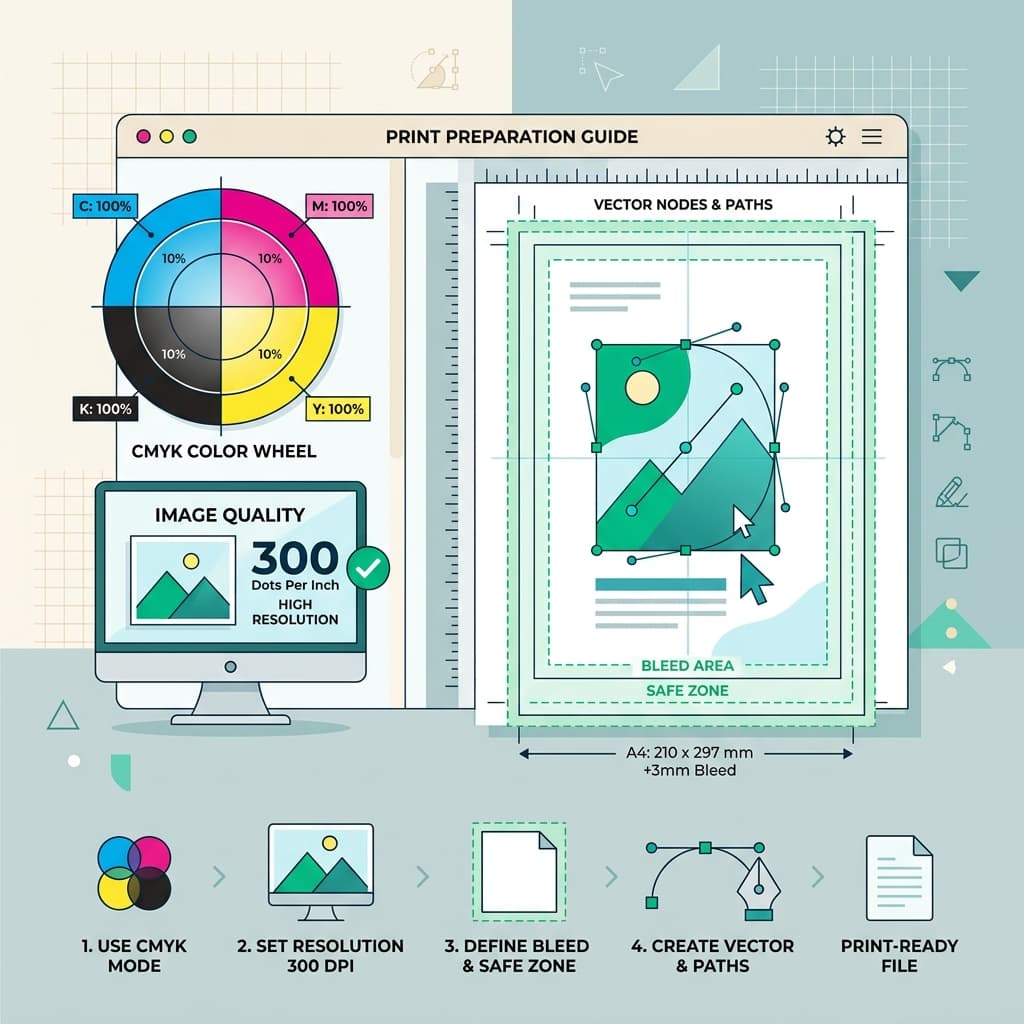
Two concepts determine print quality. Resolution is the number of pixels in the image; DPI is the number of dots packed into an inch. The general rule for print is 300 DPI. An image at 72 DPI, fine for the web, prints blurry. Building the design at print size and 300 DPI from the start is far better than enlarging it later, because scaling up a small image does not bring quality back.
The right file format
For apparel printing such as t-shirts, the format most often requested is PNG with a transparent background, which prevents an unwanted white box around the design. For sharp-edged work such as logos and typography, vector SVG is ideal because it scales. Always check which format each product requires before production.
Screens can mislead; fabric does not lie. Preparing your file for print is how you guarantee what ends up in the customer's hands.
Colour: RGB and CMYK
Screens produce colour in RGB, while printers mostly work in CMYK. So a colour that looks bright on screen can turn dull in print. Vivid blues, bright greens and neon tones in particular can shift. Checking the colour profile before production and, where possible, ordering a test print prevents surprises.
Transparent background and margins
The background should be transparent and the design should not sit tight against the edges of the print area. Elements that overflow or sit too close to the trim line may be cut off. Leaving a safe margin gives consistent results every time.
Checklist before production
- Is the resolution 300 DPI at print size?
- Is the background transparent?
- Do the colours look as you expect?
- Is the design the right size for the print area?
- Is the file within the platform's size limit?
This short check prevents most "why did it come out like this?" messages after printing. Master the technical details once and you gain fewer returns and more satisfied customers for good.
Igora Team
Igora Editorial Team
The Igora team brings together e-commerce experts, logistics specialists and AI developers with a mission to make international trade accessible for Turkish entrepreneurs.
Start Selling Globally Without Upfront Inventory
Take your brand to global markets with Igora's AI-powered stockless e-export ecosystem.
Explore Services →